


I asked a designer on my team to test what happens when you connect AI agents to design tools through MCP. We started with Figma, Framer, Webflow, Pencil, and Canva. We are a product design studio and these are the products we use ourselves.

We looked at how the products are changing under the new environmental pressure. The terms from biology. In biology, environmental pressure influences which adaptations help organisms survive.
Here is what we found:
MCP is introducing a new kind of environmental pressure
on SaaS products.
It allows AI agents interact directly with software.
And it opens up questions for business:
How do product adapt when their users are no longer exclusively human?
How do they remain valuable to humans when AI agents begin doing the work? Because humans pay the subscription as of today anyway, not agents, right?
Adaptation 1:
The SAAS UI Is For Review
One of the first things designer noticed was that her work begins with an AI assistant rather than opening Webflow for example. The assistant receives the task, interacts with Webflow through MCP, and makes changes to the existing project. Designer then opens Webflow to inspect the result and make smaller corrections.
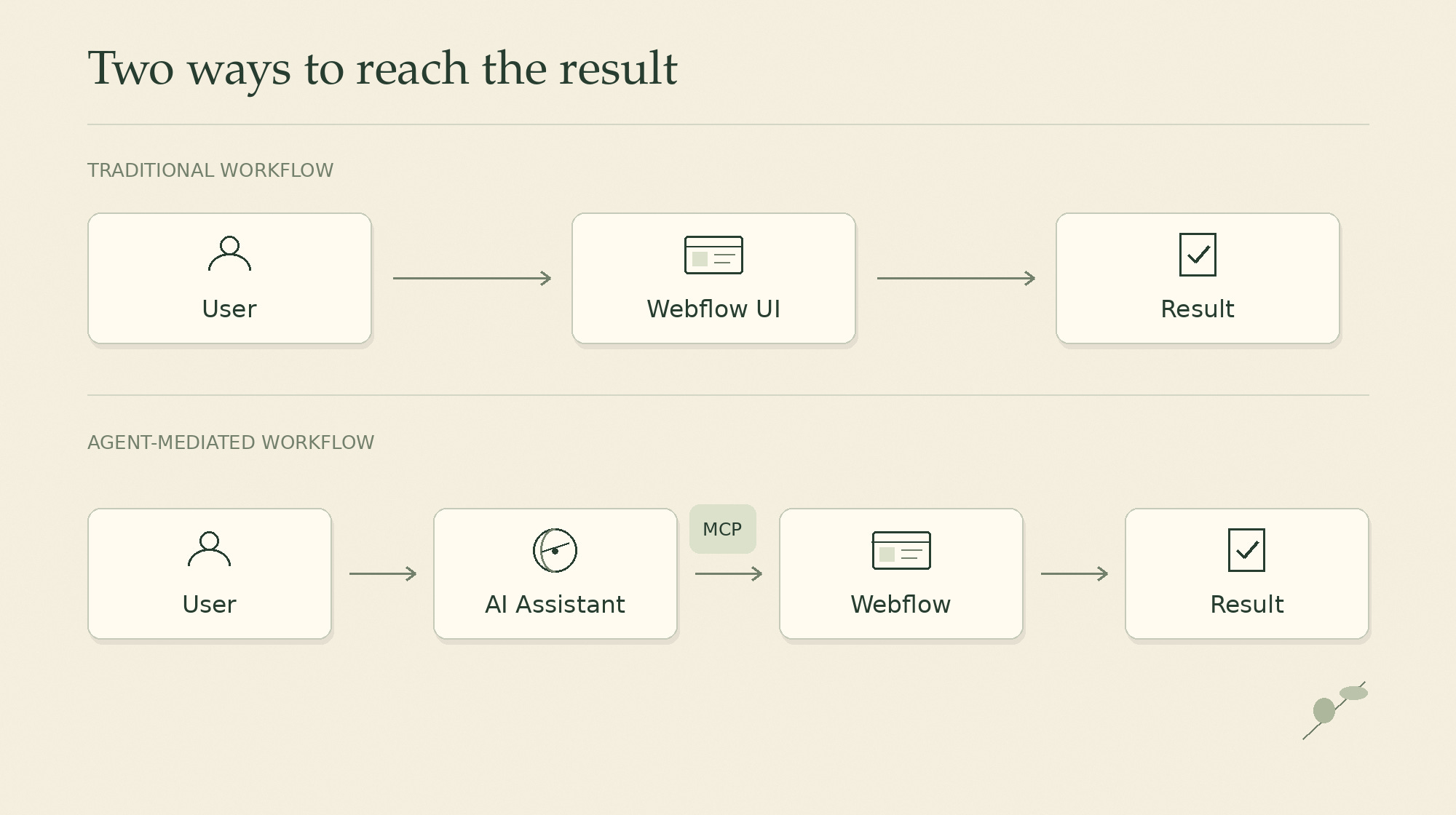
It means that Webflow is becoming more of a visual review environment in this workflow. This is not just an individual preference. The official documentation1 of several platforms reflects the same direction.
Framer allows external agents to create pages, modify layouts, update CMS content, and work on projects even while the editor is closed. The user can return afterward to review the changes. It also supports creating a branch for the agent to work on, allowing changes to be reviewed before merging or publishing.
Webflow similarly allows many MCP operations to run without the Designer open. Some actions, such as reading the current canvas selection or capturing a visual snapshot, still require its Bridge App and an active Designer session.
Figma now allows supported agents to write native content directly to the canvas, including frames, components, and variables.
These are different implementations of a similar adaptation.
The interface is not necessarily where the entire workflow takes place. It may become the place where human user inspect, evaluate, correct, approve, and coordinate work performed elsewhere.
When AI agents take over the execution part of the work, the UI can become more focused on human judgment and control.
Adaptation 2:
Context Becomes A New Capital
The designer found it useful to keep reusable instructions, project rules, and supporting documents in the Skills of her AI assistant. And it looked like if you are using the native AI of a product, you more likely prompting and repeating the context.
But from the documentation review we learned that platforms are also learning how to expose their own context to external agents.
Webflow provides one of the most interesting examples.
Its MCP server supports site-level Agent Instructions: markdown-based rules and guidance stored with the website itself. These instructions can reference actual components, styles, variables, CMS collections, pages, and locales. Unlike instructions stored inside an individual’s AI assistant, Webflow’s site-level instructions can be provided to different agents connecting to the same project.
This makes the product a source of context.
Figma also provides Skills designed to help agents work with its components, variables, and design-system structures. Its Figma Specs capabilities allow requirements and project knowledge to inform agent work.
Canva offers another form of context through Brand Kits, approved templates, assets, and existing designs.
These approaches suggest an important distinction between two kinds of knowledge.
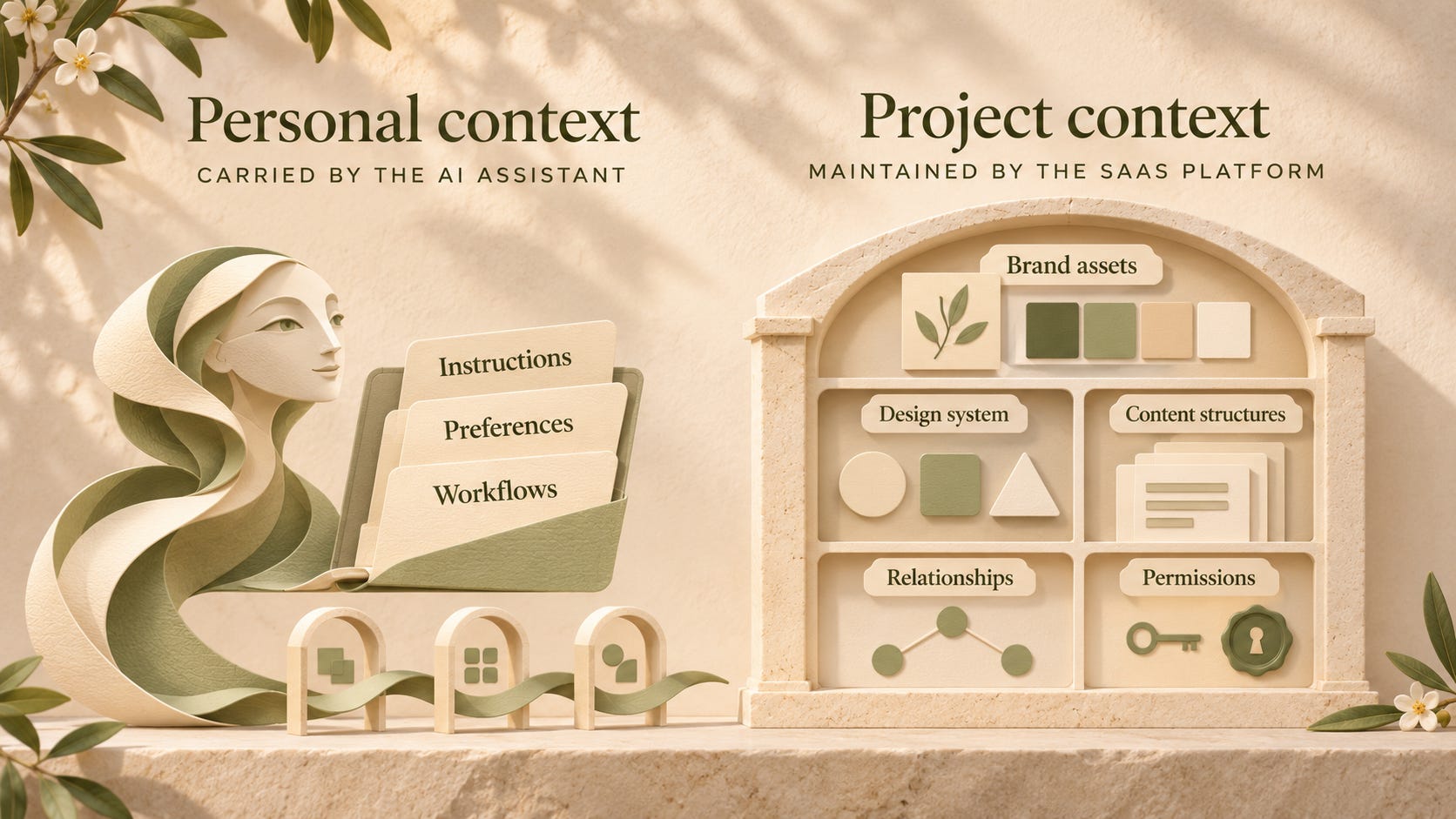
The AI assistant may carry personal instructions, preferences, and reusable workflows across products. The SaaS platform may retain the authoritative project context:
brand assets,
design-system definitions,
content structures,
relationships, and
permissions.
The challenge becomes connecting them reliably.
And the ability to provide structured, up-to-date context could become a major source of competitive advantage for SaaS platforms. An agent may be able to generate a design anywhere.
But can it generate the right design, using the correct components, with the latest brand guidelines and the appropriate project constraints? That is where product context starts really matter.
Adaptation 3:
Onboarding for The New Users
This is perhaps the most unexpected finding of our investigation. SaaS products have spent years teaching hynans how to use their products.
Now they’re onboarding AI agents.
Agents are becoming users too. And platforms are starting to establish rules of conduct for them.
Canva provides a particularly detailed example.
Its official MCP Best Practices and Usage Policy describe how they should interact with users and handle Canva’s resources.
For example, Canva instructs AI applications to preserve the substance of a user’s request rather than unnecessarily reducing a detailed brief.
Agents shouldn’t report a successful operation until the actual tool response confirms it.
For longer-running tasks, applications should provide accurate progress and completion states.
After creating or editing a design, the application should offer a clear way for the user to continue working in Canva.
And credit consumption, quotas, and plan limitations should not be hidden from the user.
These instructions establish expectations for transparency, reliability, and the relationship between the agent, the platform, and the human user.
Canva also defines rules around Brand Kits and templates. Agents cannot freely extract, cache, or reuse protected brand context outside permitted workflows.
Webflow approaches agent guidance from another direction.
It provides a Webflow Guide that agents can reference before executing tasks, site-level Agent Instructions, and Skills for specialized workflows.
Webflow’s documentation also describes how the MCP server communicates the active Designer mode, so agents can adjust their behavior to the operations currently permitted.
Figma recommends Skills that guide agents through reliable design-system-aware workflows.
The designer who research mentioned something even tha Figma asks to name the agent itself and tell its goal for interaction.
These examples reveal:
Agent onboarding provides machines with the capabilities, context, rules, and constraints required to operate it correctly.
A platform can no longer assume that exposing an action is enough.
It must also communicate when that action is appropriate, how it should be performed, and what successful completion looks like.
A New Code of Conduct?